How To Create A Hosting Account On Kinsta For Your WordPress Website
Psst! This page contains affiliate links, which means that I may earn a small commission, at no cost to you, if you make a purchase through a link. By doing so, you’re helping me pay my biz bills (and to feed my kitty, drink coffee & keep buying design books and art supplies, which I love). Learn more in my Affiliate Disclosure.
Kinsta is a hosting provider that allows you to have a self-hosted WordPress website.
Kinsta offers premium managed WordPress hosting with free migrations, free CDN, edge caching, 24/7 support, automatic SSL certificates, site cloning, and multi-site plans.
If you’re wondering how you can create a hosting account on Kinsta for your WordPress website, then you’re in the right place.
In this blog post, I’ll show you how easy it is to register on Kinsta to start your blog on WordPress.
Grab your cup of your favorite beverage (I have my cup of coffee here ☕), and let’s start.
Managed WordPress hosting bonus
If you purchase a hosting plan on Kinsta, SiteGround, Lyrical Host, Rocket.net, or Elementor with my affiliate link (or an Elementor Pro subscription), I’ll give you my Digital Download Instructions Template (value $39) for free. If you sell digital products, and you need to send a PDF with download instructions to your clients after purchasing, this template might be useful for you.
To claim this bonus, you’ll have to send me a screenshot of your purchase to hi@soulfulgirls.com. Once my affiliate commission is approved, I’ll give you a 100% coupon code to get this template for free.
This isn’t valid for free trials or the free Elementor Plugin.


Why you should get managed WordPress hosting on Kinsta
Kinsta includes enterprise-level features on all managed WordPress hosting plans.
You can choose a data center for maximum speed, and Kinsta also has 260+ CDN locations (CDN: Content Delivery Network) around the world, which means that no matter where your visitors are, your website will load fast.
With Kinsta Edge Caching, you can boost your site speed and reduce your website’s load time by 49%.
Kinsta also has an Application Performance Monitoring (APM) Tool available for free on all WordPress hosting plans. With this tool, you can visualize site speed issues quickly, no matter your technical skills.
Kinsta offers automatic daily backups on all hosting plans (from 14 to 30 days back, depending on the plan) so that you always have a backup of the most recent version of your website from the prior day. There are addons available to backup your website automatically every hour or every six hours. Kinsta also monitors your site 480 times per day and has a 99.9% uptime guarantee.
Kinsta includes free SSL certificates, enterprise-level firewall protection, and a malware security pledge, which means that if you have a compromised site, the Kinsta Team will fix it for you for free.
If you’d like to duplicate your website, make changes and test them before publishing them, Kinsta has a staging environment available on all hosting plans for free.
If you already have a website, Kinsta has dedicated migration experts that will take care of the migration process for free.
The Kinsta Support Team is available 24/7/365 to offer you technical support in the following languages: English, Portuguese, Spanish, Italian, French, German, Japanese, and Danish.
Choose a managed WordPress hosting plan on Kinsta
Go to Kinsta and click on “Pricing”.

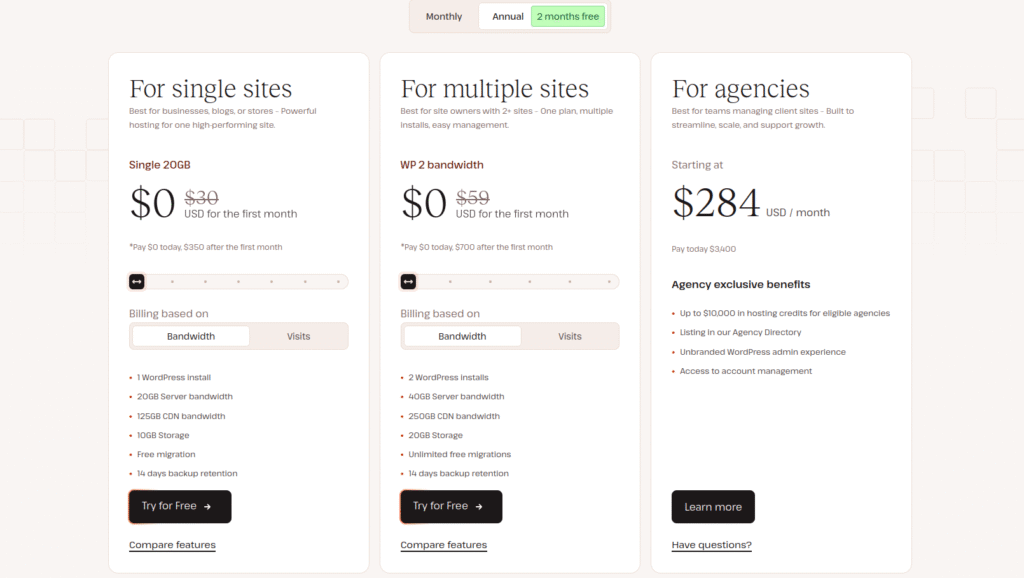
Then browse the different Single-Site Plans, Multi-Site Plans, or Agency Plans, to choose a WordPress hosting plan.
Kinsta monthly and yearly plans
The difference is that if you pay yearly, you can get two months for free during the first year (it will renew at full price).
Kinsta has Single-Site, Multi-Site, or Agency hosting plans.
If you have a small business and one website, then their Single-Site Single 35k, Single 65k, or Single 125k Plans may be the most suitable for you (the numbers “35k”, “65k”, and “125k” in these plans refer to the monthly visits).
If you have more than one website, you can choose one of Kinsta’s Multi-Site plans, which gives you different options depending on how many websites you have or are planning to have in the near future.
Some Single-Site plans and Multi-Site plans include the first month for free on selected plans.
(Disclaimer: Kinsta may change their offers from time to time, so take a look at their prices and plans before purchasing.)
Important
There’s no offer of a free domain for the first year or a free email service, and you can purchase hosting for one year only (there are no offers for two or three years).
Rocket.net offers plans for two or three years with a discount (you get six months for free when you purchase a hosting plan for two years, and twelve months for free when you purchase a hosting plan for three years, though this may change from time to time). But like Kinsta, they don’t offer a free domain for the first year or a free email service.
If this is a deal-breaker for you, then you can consider creating a hosting account on SiteGround instead.
While Lyrical Host doesn’t include a free domain for the first year, they offer email accounts and up to two years hosting plans (they even have a six month hosting plan, which I haven’t seen anywhere else). You can use my coupon code SOULFULGIRLS10 to get 10% off any WordPress hosting plan on Lyrical Host.
Another option that you have is to purchase a domain name on Namecheap, where there are always promotions available. They also offer email services.
Personally, I use:
- Lyrical Host for hosting my website nowadays. You can get 10% off any hosting plan on Lyrical Host with my coupon code SOULFULGIRLS10 at checkout.
- When I first migrated from Squarespace to WordPress, I hosted my website with SiteGround for one year.
- Namecheap to manage my domain name (they offer free domain privacy; on SiteGround you have to pay separately for this).
- Google Workspace for my business email (even though I could have free email accounts for hosting my website on Lyrical Host).
I prefer to keep all these services separately, but that’s just my opinion. So choose what you think is better for your business.
If you don’t mind managing your domain name and your business email on another platform (like I do), select the hosting plan that best suits your needs on Kinsta, and click on “Signup”.
Create an account on Kinsta
Enter your first name, last name, email address, and a password.
At the top of the screen, you can change your hosting plan.
After you agree to Kinsta’s terms of service, click on “Continue”.

Enter your billing information
You can modify your order summary in this section too.
Select company or individual, and then fill the spaces with your country, state, city, zip code, and address.
Then enter your credit card details.
Once you’re done submitting your information, click on “Finish up”.
You will receive an email with your purchase confirmation and account details.
That’s it! You’re ready to create your WordPress website. Congrats, beautiful!
More WordPress resources for your online business
Design a pretty website on WordPress with Elementor.
Add more functionality to design your website with Elementor with the Royal Elementor Addons.
Get a pretty WordPress theme for entrepreneurs from Bluchic.
Start building your email list for free with GetResponse.
Create your email list + checkout on Flodesk, and send beautiful emails easily, with 25% off during your first year subscription with my coupon code SOULFULGIRLS at checkout.
Start selling your online products for free on Payhip (with a 5% commission), or use my coupon code SOULFULGIRLS10 to get 10% off on any paid plans.
You can also try SendOwl for free to sell your online products easily.
I hope you found this Kinsta tutorial helpful!
Cheers to creating your new website! 😊
With all my love,
Giselle
Get a free workbook template

Related Posts


Meet the author
Hi, beautiful! I’m Giselle.
I provide female entrepreneurs, like you, beautiful and soulful images, Flodesk templates, and Canva templates that they can use in their personal brands.
I also write resource tutorials and reviews to make your blogging life easier, and have fun designing and selling printable planners.