Why I choose Flodesk to grow my email list
Psst! This page contains affiliate links, which means that I may earn a small commission, at no cost to you, if you make a purchase through a link. By doing so, you’re helping me pay my biz bills (and to drink coffee; lots of coffee, & to keep buying design books and art supplies, which I love). Learn more in my Affiliate Disclosure.
Flodesk is an email marketing platform for small businesses. It’s the one that I’ve been using since I launched my business in 2020.
At the time, Flodesk was still in beta testing. Since then, they’ve added many features (including e-commerce). So if you’re considering signing up to Flodesk, read my honest review with the reasons why I choose Flodesk to grow my email list.
Now grab a cup of your favorite beverage (I have my cup of coffee here ☕), and let’s start.
Flodesk discount code and bonus
If you sign up with my affiliate link or with my discount code SOULFULGIRLS, you get 25% off in your monthly or yearly email marketing subscription in Flodesk during your first year.
FLODESK BONUS: If you purchase a Flodesk subscription with my affiliate link or my affiliate code, I’ll also give you one of my Flodesk link in bio templates of your choice for free (there are five different styles: Authors, Bold, Dreamy, Mystical, and Sophia). Value: $21.
To claim this bonus, you’ll have to send me a screenshot of your purchase to hi@soulfulgirls.com and tell me which Flodesk template you want. I’ll give you a 100% coupon code to get that template for free.
This isn’t valid for free trials or the free plan. You have to purchase a Flodesk subscription to qualify for this bonus.


My Flodesk honest review
Let me tell you a little story.
Once upon a time (that is, five years ago), I was almost ready to launch my business (after spending waaaay too much unnecessary time designing and redesigning my website on Squarespace; don’t ask).
But there was a little problem: the email marketing platforms that I tried were too difficult to manage, and the results were not. pretty. at. all. (I’m being polite. I honestly wanted to use all caps there.)
That is, until I tried Flodesk.
Now, picture me five years ago, with absolutely no experience in email marketing. Just a girl with a dream, bootstrapping her project with a part-time job.
All I wanted was to find an email marketing platform where I didn’t have to use code to design pretty emails. That was it.
And yet, out of many platforms that I tried, Flodesk was the only one where I could design a beautiful email easily, no code or previous email marketing experience required.
So I’ve stayed in Flodesk since then. I’ve never considered changing platforms (like I did with my website, which is now on WordPress).
If you ask me why: simplicity and beauty (I’m a photographer after all, so visuals are my thing).
I don’t like complicated things or systems. I changed to WordPress when it became easier enough for me to understand. Meanwhile, I just stayed on Squarespace.
Want to show your latest Instagram posts in your emails? Pfff. That’s easy. Just connect your Instagram account to Flodesk and add an Instagram block.
Want to create an email footer and replicate it in all your emails in different workflows? Just save it as a favorite block and add it to any email that you want to. No need to design everything from scratch again.
Want to copy your button style in all your emails? Just save the button style as a favorite.
Want to use your brand fonts in your emails? Again, Flodesk makes it easy with their custom email layouts.
Want to send a poll to your audience to ask them which kind of content or product they would like next? Just add a poll block.
Want to add a pretty countdown timer to your emails? Just add a countdown timer block. No need to use a third-party countdown timer anymore that looks, ahem, not visually appealing most of the time.
I could go on and on about this, but you get what I mean. Flodesk saves you time and makes your emails pretty and on brand.
Now let’s talk about Flodesk templates and new integrations in the next section.
A whole library of Flodesk templates

One of the reasons why I love Flodesk so much is because they give you a lot of beautiful templates to choose from.
If you don’t know where to start designing your email, link in bio, full page form, or checkout page, Flodesk makes it really easy for you.
Even if you want to design your own email template from scratch (I have a step by step tutorial to help you with that), you can browse Flodesk’s library of templates to find inspiration and to get an idea of what kind of pretty designs you can achieve easily on the platform.
Flodesk new integrations
Flodesk + Canva integration
With the new Flodesk + Canva integration, you can import your designs directly from Canva in png or gif format.

Once you choose a design, you can hover over the image on the menu on the right side of the screen, and click on “Edit in Canva”. You will be prompted to login to Canva to edit your design.
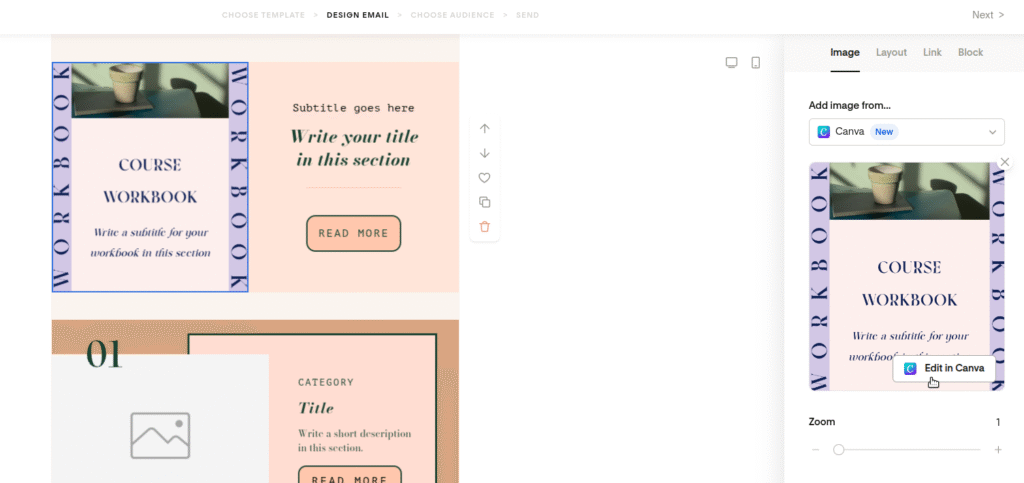
When you’re done editing, just click on “Return to Flodesk” on the right side of the top bar to continue working on your email.
This integration gives you a lot of possibilities to create pretty emails easily.
Before this integration, you had to edit your designs in Canva first, download them to your laptop, and then upload them to Flodesk. But now you can save one step in your to-do list.
Flodesk + ThriveCart Pro integration
If you use ThriveCart Pro to sell your digital products and online courses, this ThriveCart Pro + Flodesk integration is for you.
With this integration, you don’t need a third party app like Zapier anymore to trigger post-purchase workflows in Flodesk and welcome your customers. This ThriveCart Pro + Flodesk integration also works to trigger abandoned-cart workflows.
In this case, you’re saving a third party subscription and, more importantly, time figuring out how to make the zaps work.
Flodesk + Squarespace integration
If you sell your digital products, subscriptions, and online courses on Squarespace, you can import your customers directly into Flodesk with the Flodesk + Squarespace integration.
In this way, you can send them post-purchase workflows after they complete a purchase, without having to sync the data using a third-part app.
Please note: This integration is not available for Acuity/Squarespace scheduling.
Flodesk + Manychat integration
If you use Manychat to automate your conversations on Instagram, Whatsapp, Messenger, and TikTok, this new Flodesk + Manychat integration might be useful for you.
With this integration, you can send the emails that you collect in your conversations in Manychat directly to your Flodesk account, without paying for a third-party app (or having to spend time adding them manually). In this way, you can automatically add and segment your new subscribers in Flodesk.
More Flodesk Resources
Free Flodesk template
Design pretty emails in Flodesk with my free Flodesk template
Free Flodesk form template
Create a beautiful sign up page in Flodesk with this free Flodesk form template
Flodesk 25% off discount code
Get 25% off in the first year of your Flodesk subscription, and a 14 day free trial
Flodesk email template tutorial
How to design an email template in Flodesk for your creative business
Flodesk link in bio tutorial
How to design your own link in bio in Flodesk
Flodesk sign up form tutorial
How to design a full page form in Flodesk
Flodesk template shop
Get pretty done-for-you Flodesk templates in our Flodesk template shop
I hope that was useful for you!
Don’t forget to use my discount code SOULFULGIRLS at checkout to get 25% off in your monthly or yearly subscription in Flodesk during your first year. 😉😻
With all my love,
Giselle
Get my free Flodesk template

Related Posts


Meet the author
Hi, beautiful! I’m Giselle.
I provide female entrepreneurs, like you, beautiful and soulful images, Flodesk templates, and Canva templates that they can use in their personal brands.
I also write resource tutorials and reviews to make your blogging life easier, and have fun designing and selling printable planners.